nope
Shortcode
[testimonial quote="…" author="…" role="…" avatar="123" featured="1"]
Attributes are typed by hand. There is no media picker and no preview.
wordpress plugin · gpl
You describe the fields of a block in a PHP array. Define Blocks registers the block and builds its controls in the editor. The output is rendered in PHP, on the server.
There is no tagged release yet, so the download is the master branch. The zip extracts to define-blocks-master: rename the folder to define-blocks.
01 example
The testimonial block below has four fields inside the block, a color setting in the sidebar and a toggle in the toolbar. This call is the whole definition. The markup is in blocks/testimonial.php, shown in 08 render.
define_block_type( 'acme/testimonial', [
'title' => 'Testimonial',
'icon' => 'format-quote',
'schema' => [
[
'scope' => 'content',
'fields' => [
'quote' => [ 'type' => 'richtext', 'label' => 'Quote' ],
'author' => [ 'type' => 'text', 'label' => 'Author' ],
'role' => [ 'type' => 'text', 'label' => 'Role' ],
'avatar' => [ 'type' => 'media', 'label' => 'Avatar', 'focus' => '1:1' ],
],
],
[
'scope' => 'inspector',
'panel' => 'Card',
'fields' => [ 'accent' => [ 'type' => 'color', 'label' => 'Accent' ] ],
],
[
'scope' => 'toolbar',
'fields' => [
'featured' => [ 'type' => 'checkbox', 'label' => 'Featured', 'icon' => 'star-filled' ],
],
],
],
'render' => __DIR__ . '/blocks/testimonial.php',
] );Call it on init, from a theme or a plugin.
Mock of the Gutenberg editor with the Testimonial block: Quote, Author, Role and Avatar fields inside the block, a Card panel with an Accent color in the sidebar, and a Featured star toggle in the block toolbar.
testimonial
02 why
Many custom blocks are small forms: a quote, a name, an image and a couple of settings. With the official tooling each of them becomes a JavaScript project with a block.json, an edit component and a build.
Define Blocks keeps the definition in PHP. The editor interface comes precompiled inside the plugin, so your project has nothing to build. Block definitions are plain PHP arrays and go through version control and code review with the rest of the theme.
nope
[testimonial quote="…" author="…" role="…" avatar="123" featured="1"]
Attributes are typed by hand. There is no media picker and no preview.
hmm
Every change needs npm run build. It is the right choice when the block needs custom editor behavior.
ok
define_block_type() callReload the editor to see the changes.
03 wordpress 7.0
Since WordPress 7.0, released on 20 May 2026, core can register a block from PHP alone, using register_block_type(), the autoRegister support and a render callback. For a block with a few simple settings this is enough.
register_block_type( 'acme/notice', [
    'title'           => 'Notice',
    'attributes'      => [
        'message' => [ 'type' => 'string', 'label' => 'Message', 'default' => '' ],
        'tone'    => [ 'type' => 'string', 'label' => 'Tone', 'enum' => [ 'info', 'warning' ], 'default' => 'info' ],
    ],
    'supports'        => [ 'autoRegister' => true ],
    'render_callback' => fn( $attributes ) => sprintf(
        '<p class="notice is-%s">%s</p>',
        esc_attr( $attributes['tone'] ),
        esc_html( $attributes['message'] )
    ),
] );
Core generates a text input and a select in the sidebar for these two attributes.
The controls are limited by design, and the core dev note says the feature is not meant to replace JavaScript blocks. Define Blocks covers the cases core leaves out and runs on WordPress 6.6 and later, including 7.0.
core 7.0
define blocks
04 how it works
Each field in the array has a type and a label, and can have a default, a position in the editor, a condition and validation rules. Call define_block_type() on init: registrations are collected at priority 99.
Define Blocks registers a native block (apiVersion 3) and places the controls where Gutenberg normally shows them. A post with an invalid visible field can't be saved until the field is fixed.
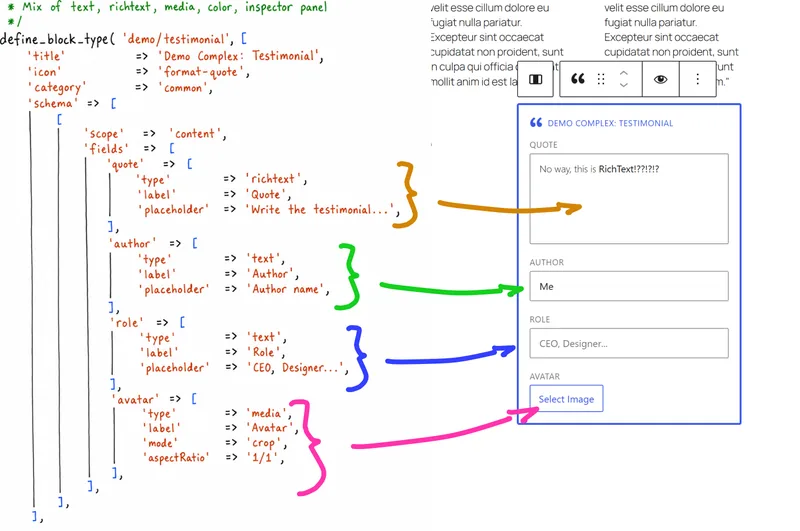
'mode' => 'crop' and 'aspectRatio' are not media options. 'focus' => '1:1' adds a focal point and a square preview.A closure, a template file or a function named after the block receives the values and returns HTML. The output is wrapped with get_block_wrapper_attributes(), so alignment, colors and custom classes work as in core blocks.
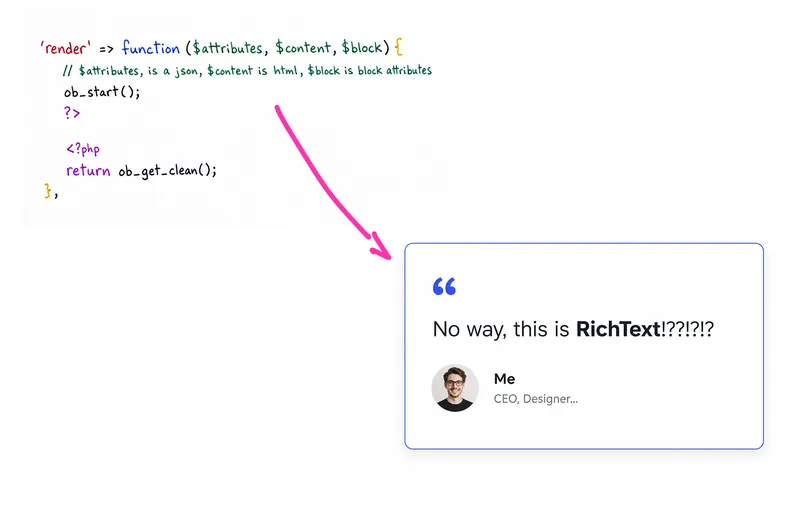
$block is the WP_Block instance, not the block attributes.05 scopes
Every schema entry has a scope. The five scopes match the places where core blocks keep their controls. A scope can be repeated, and each inspector entry becomes a separate panel.
All fields write to the same values object, so a toggle in the toolbar can control a condition in the sidebar. Without scopes, an associative array of fields goes to the canvas.
On the canvas, inside the block.
[
    'scope'  => 'content',
    'fields' => [
        'name'  => [ 'type' => 'text', 'label' => 'Product name' ],
        'photo' => [ 'type' => 'media', 'label' => 'Photo' ],
    ],
],[
'scope' => 'inspector',
'panel' => 'Pricing',
'icon' => 'money-alt',
'initialOpen' => true,
'fields' => [
'price' => [ 'type' => 'number', 'label' => 'Price', 'min' => 0, 'step' => 0.01 ],
'on_sale' => [ 'type' => 'checkbox', 'label' => 'On sale' ],
],
],[
'scope' => 'inspector-advanced',
'fields' => [
'sku' => [ 'type' => 'text', 'label' => 'SKU' ],
],
],[
'scope' => 'toolbar',
'fields' => [
'highlight' => [ 'type' => 'checkbox', 'label' => 'Highlight', 'icon' => 'star-filled' ],
'size' => [
'type' => 'select',
'label' => 'Size',
'icon' => 'editor-expand',
'options' => [ 'compact', 'full' ],
],
],
],[
'scope' => 'toolbar-dropdown',
'icon' => 'cart',
'label' => 'Buy button',
'fields' => [
'buy_url' => [ 'type' => 'url', 'label' => 'Checkout URL' ],
'new_tab' => [ 'type' => 'checkbox', 'label' => 'Open in a new tab' ],
],
],Choose a scope to see where its fields appear.
06 field types
Each type has its own editor control, a predictable value shape and a sanitizer. There are also 58 aliases, so image works as media and toggle as checkbox. Type names are case-insensitive, and you can register your own types.
Google maps and geocoders need an API key through defb_google_maps_key, Mapbox a token through defb_mapbox_key. OpenStreetMap needs neither. In the toolbar scope, select, checkbox, text, number and autocomplete switch to their toolbar versions automatically.
41 types
From a single line to rich text.
textSingle-line input. As number, a numeric input that stores a number.aka target, numbertext-with-parserText input whose value runs through the defb.parse.{parser} JS filter.aka textwithparser, text_with_parsertextareaMultiline plain text, with configurable rows.aka text-area, code, jsonrichtextGutenberg RichText with inline formatting. Stores HTML.aka rich_text, rich-text, editor, classic-editorSingle and multiple choice, slider.
selectDropdown, one value. Options as strings, label/value pairs or posts.aka radiomulti-selectSearchable picker for several values.aka multiselect, multi_select, select-multi, multi-selectsautocompleteSearchable single choice.aka comboboxmulti-autocompleteSearchable, several values.aka multiautocomplete, multi_autocomplete, multi-auto-completechipsFree tags, created while typing.aka tokenfieldcheckboxToggle switch. Stores a boolean.aka toggle, switchrangeSlider with min, max and step.From the Media Library. Video is a URL.
mediaMedia Library picker. Optional focal point and preview ratio with focus.aka image, img, picturefileAny file from the Media Library.gallerySeveral images, sortable.videoYouTube or Vimeo URL with an embed preview.Links, dates, colors, posts and terms.
colorTheme palette plus custom colors. Optional alpha.urlURL input, with post suggestions when postType is set.linkURL, link text and a new-tab switch.aka cta, buttondateDate picker.aka datepickertimeTime picker.datetimeDate and time picker.aka datetimepickerpost-selectorSearch and pick posts, sortable, with thumbnails.aka postselector, post_selector, postselectorfieldtaxonomyTerm search with parent paths. Can create terms.Repeaters, groups, tabs and InnerBlocks.
repeaterRows of sub-fields with drag and drop, min/max and inline header fields.groupVisual grouping. Values stay flat.tabpanelsFields in tabs. Values stay flat.aka tabpanel, tab-panel, tab-panels, tabsinnerblocksNative InnerBlocks area, one per block.aka innerblock, inner-block, inner-blocksGoogle Maps, Mapbox and OpenStreetMap, with a map or address only.
google-mapGoogle Maps with a draggable pin and reverse geocoding. Needs a key.aka map, maps, maptarget, map_target, map-target, map-bounds, map-pointerosm-mapOpenStreetMap through Leaflet. No key.aka osm, openstreetmap, open-street-map, leafletmapbox-mapMapbox tiles through Leaflet. Needs a token.aka mapboxgoogle-geocoderGoogle address search, no map.aka geocoder, google-geocodemapbox-geocoderMapbox address search, no map.aka mapbox-geocodeosm-geocoderNominatim address search, no map, no key.aka osm-geocode, openstreetmap-geocoder, open-street-map-geocoderControls for the block toolbar.
toolbar-toggleToolbar button that toggles on and off.toolbar-selectToolbar dropdown menu, one value.toolbar-dropdownToolbar menu that ticks the chosen option. Takes label/value options.toolbar-inputToolbar button that opens a text or number input.toolbar-autocompleteToolbar button that opens a searchable choice.Hidden values, read-only values and headings.
hiddenNo UI. Stores a value.valueRead-only, disabled input.titleA heading between fields. Stores nothing.No match. Try image, toggle or map.
07 conditions
A field with show appears when its condition is true; hide does the opposite. Simple checks can be written as an array, the rest as a string expression. The same rules run in the editor (JavaScript) and on save (PHP), and hidden fields are not validated.
A malformed expression leaves the field visible and, with WP_DEBUG on, reports the error. in and contains compare plain values, not the {value, label} items of multi-select, chips or taxonomy fields.
== != === !== > < >= <=. == is strict.&& || ! and parentheses.in [ … ], contains, .includes()items empty, items !empty. The operator always follows the field.settings.columns$index (from 0) and root.field[ 'layout' => 'grid' ], a list of allowed values, [ 'operator' => '>=', 'value' => 3 ], and 'relation' => 'OR', 'XOR', 'NAND' or 'NOR'.A Layout panel with working controls. Change them and the dependent fields appear or disappear.
[
    'scope'  => 'inspector',
    'panel'  => 'Layout',
    'fields' => [
        'layout'       => [ 'type' => 'select', 'label' => 'Layout', 'default' => 'grid',
                            'options' => [ 'stack', 'split', 'grid' ] ],
        'columns'      => [ 'type' => 'range', 'label' => 'Columns', 'default' => 3,
                            'min' => 2, 'max' => 6,
                            'show' => 'layout == "grid"' ],
        'compact'      => [ 'type' => 'checkbox', 'label' => 'Compact cards',
                            'show' => 'layout == "grid" && columns >= 4' ],
        'media_side'   => [ 'type' => 'select', 'label' => 'Image side', 'default' => 'left',
                            'options' => [ 'left', 'right' ],
                            'show' => [ 'layout' => 'split' ] ],
        'equal_height' => [ 'type' => 'checkbox', 'label' => 'Equal height',
                            'hide' => 'layout == "stack"' ],
        'has_cta'      => [ 'type' => 'checkbox', 'label' => 'Add a button', 'default' => false ],
        'cta'          => [ 'type' => 'link', 'label' => 'Button',
                            'show' => 'has_cta' ],
        'cta_note'     => [ 'type' => 'text', 'label' => 'Small print',
                            'show' => 'has_cta && layout in ["stack", "split"]' ],
    ],
],The demo reproduces the plugin's rules in a few lines of JavaScript.
Repeater rows have $index, starting from 0, and root, which points to the block's values. Use single quotes around the expression, otherwise PHP interpolates $index.
'style'  => [ 'type' => 'select', 'label' => 'Style', 'options' => [ 'minimal', 'cards' ] ],
'slides' => [
    'type'       => 'repeater',
    'label'      => 'Slides',
    'min'        => 1,
    'max'        => 8,
    'previewKey' => 'title',
    'fields'     => [
        'title'   => [ 'type' => 'text', 'label' => 'Title', 'inline' => true ],
        'image'   => [ 'type' => 'media', 'label' => 'Image' ],
        'divider' => [
            'type'  => 'checkbox',
            'label' => 'Divider above',
            'show'  => '$index > 0 && root.style != "minimal"',
        ],
    ],
],08 render
render accepts a closure, a function name or the path to a template file. Without it, acme/hero looks for a function called acme_hero_render(). The callback is resolved at render time, so a plugin can register the block and a theme can provide the markup.
define_block_type( 'acme/hero', [
    'title'  => 'Hero',
    'icon'   => 'cover-image',
    'schema' => [
        'heading' => [ 'type' => 'richtext', 'label' => 'Heading' ],
        'image'   => [ 'type' => 'media', 'label' => 'Background', 'focus' => true ],
    ],
    'render' => function ( array $attributes ): string {
        $values  = $attributes['values'] ?? [];
        $image   = $values['image'] ?? [];
        $focus_x = (float) ( $image['focus']['x'] ?? 0.5 ) * 100;
        $focus_y = (float) ( $image['focus']['y'] ?? 0.5 ) * 100;

        return wp_get_attachment_image( $image['id'] ?? 0, 'full', false, [
            'class' => 'hero__image',
            'style' => sprintf( 'object-position: %.1f%% %.1f%%', $focus_x, $focus_y ),
        ] ) . '<h2 class="hero__heading">' . wp_kses_post( $values['heading'] ?? '' ) . '</h2>';
    },
] );<?php
$values = $attributes['values'] ?? [];
$classes = empty( $values['featured'] ) ? 'testimonial' : 'testimonial is-featured';
$accent = ( $values['accent'] ?? '' ) ?: 'currentColor';
?>
<figure class="<?php echo esc_attr( $classes ); ?>" style="--accent: <?php echo esc_attr( $accent ); ?>">
<blockquote><?php echo wp_kses_post( $values['quote'] ?? '' ); ?></blockquote>
<figcaption>
<?php echo wp_get_attachment_image( $values['avatar']['id'] ?? 0, 'thumbnail' ); ?>
<strong><?php echo esc_html( $values['author'] ?? '' ); ?></strong>
<span><?php echo esc_html( $values['role'] ?? '' ); ?></span>
</figcaption>
</figure>$attributes['values'] is a flat array: groups and tabs don't add nesting. Fields without a default may be missing, so read them with ??. Rich text is HTML: print it with wp_kses_post().
With 'frontend_preview' => true the block toolbar shows a Preview button. The render runs through a REST request, which checks edit_post, and its HTML replaces the fields. The previous result stays visible while the next one loads. The shorthand also opens new blocks in preview mode; to have only the button, use 'settings' => [ 'frontendPreview' => true ].
Preview styles are not loaded automatically. Pass file paths or raw CSS to the defb_preview_style filter: the rules are scoped to .defb-preview and relative url()s are rebased.
define_block_type( 'acme/quote', [
    'title'    => 'Quote',
    'settings' => [ 'frontendPreview' => true ],
    'schema'   => [ 'text' => [ 'type' => 'richtext', 'label' => 'Text' ] ],
    'render'   => __DIR__ . '/blocks/quote.php',
] );

add_filter( 'defb_preview_style', function ( $sources ) {
    $sources[] = get_theme_file_path( 'assets/css/blocks.css' );
    $sources[] = '.quote { border-left: 3px solid currentColor; padding-left: 1rem; }';
    return $sources;
} );| field type | value |
|---|---|
text, textarea, select, autocomplete, date, time, datetime | string |
richtext | HTML string |
number (alias), range | int or float |
checkbox, toolbar-toggle | bool |
url, video | URL string |
color | hex, rgba() or another CSS color |
media | id, url, alt, title, sizes, and focus {x, y} when the field sets focus |
gallery | list of id, url, alt, title |
file | id, url, name, size, mime |
link | url, title, opensInNewTab |
post-selector | list of id, title, permalink, thumbnail |
multi-select, multi-autocomplete, chips, taxonomy | list of value, label |
| maps and geocoders | lat, lng, latitude, longitude, formatted_address, address, query |
repeater | list of rows, each with a stable _defb_id |
09 data
defb_get_block() and post metaValues are stored in post_content, in the block's values attribute. defb_get_block() returns the first instance of a block, or a single field of it. defb_get_blocks() returns every instance, including those inside InnerBlocks, with defaults applied.
$post_id = get_queried_object_id();

$hero    = defb_get_block( $post_id, 'acme/hero' );
$heading = defb_get_block( $post_id, 'acme/hero', 'heading' );
$image   = $hero['image']['url'] ?? '';

foreach ( defb_get_blocks( $post_id, 'acme/slide' ) as $slide ) {
    printf( '<li>%s</li>', esc_html( $slide['title'] ?? '' ) );
}With saveInMeta the value is copied to post meta on save, so WP_Query can filter by it. It is written only if the value validates and the user can edit that meta key. For keys starting with an underscore, register the meta with an auth_callback.
validate accepts rules (required, pattern, minLength, maxLength, min, max) or a callable. saveCallback receives ($value, $post_id, $field_key) for custom handling.
define_block_type( 'acme/event', [
    'title'  => 'Event',
    'schema' => [
        'status' => [
            'type'       => 'select',
            'label'      => 'Status',
            'options'    => [ 'on-sale', 'sold-out', 'cancelled' ],
            'default'    => 'on-sale',
            'saveInMeta' => 'event_status',
        ],
    ],
    'render' => __DIR__ . '/blocks/event.php',
] );

$sold_out = get_posts( [
    'post_type'  => 'post',
    'meta_key'   => 'event_status',
    'meta_value' => 'sold-out',
] );
saveInMeta works on top-level fields and inside groups and tabs, not in repeater rows. With two instances of the same block in a post, the last one is saved. Removing the block does not delete the meta.
10 extend
A field type is a React component registered on window.DefineBlocks.Extensions and loaded with defb_register_custom_field( __FILE__ ). JSX is optional: build/index.js can be written by hand with createElement. A PHP sanitizer keeps the values clean on save and in previews.
add_action( 'plugins_loaded', function () {
    if ( ! function_exists( 'defb_register_custom_field' ) ) {
        return;
    }

    defb_register_custom_field( __FILE__, [ 'star-rating' ] );
    defb_register_custom_field_sanitizer( 'star-rating', fn( $value ) => max( 0, min( 5, (int) $value ) ) );
} );<?php return [ 'dependencies' => [ 'wp-element', 'wp-components' ], 'version' => '1.0.0' ];const { createElement } = wp.element;
const { Button } = wp.components;
const StarRating = ( { id, field, value, onChange } ) => {
const rating = Number( value ) || 0;
const stars = [ 1, 2, 3, 4, 5 ].map( ( star ) =>
createElement( Button, {
key: star,
icon: star <= rating ? 'star-filled' : 'star-empty',
label: `Rate ${ star } of 5`,
isPressed: star === rating,
onClick: () => onChange( star === rating ? 0 : star ),
} )
);
return createElement(
'fieldset',
{ id, className: 'star-rating' },
createElement( 'legend', null, field.label ),
stars
);
};
window.DefineBlocks = window.DefineBlocks || {};
window.DefineBlocks.Extensions = window.DefineBlocks.Extensions || {};
window.DefineBlocks.Extensions[ 'star-rating' ] = StarRating;'rating' => [ 'type' => 'star-rating', 'label' => 'Rating' ],PHP filters: defb_register (definitions, per post), defb_preview_style, defb_google_maps_key, defb_mapbox_key, defb_editor_debug, defb_schema_field_types, defb_schema_field_properties.
JavaScript hooks, through @wordpress/hooks: defb.blockSettings, defb.ready.{block}, defb.change.{block}.{field}, defb.toggle.{block}.{field}, defb.toolbar.toggle, defb.parse.{parser}, defb.fieldRenderError.
With WP_DEBUG on, an unknown type or property, a duplicate name, a malformed condition, a reference to a missing field or a second InnerBlocks area triggers _doing_it_wrong() with the block name and the field path. defb_schema_diagnostics() returns the same list without notices, which is useful in tests.
parent, ancestor, usesContext and providesContext are passed to the native registration. providesContext maps to the whole values object, so read the key you need from it. Every block also receives postId and postType, which makes it work inside a Query Loop.
define_block_type( 'acme/faq', [
    'title'           => 'FAQ',
    'providesContext' => [ 'acme/faqValues' => 'values' ],
    'schema'          => [
        'style' => [ 'type' => 'select', 'label' => 'Style', 'options' => [ 'plain', 'boxed' ] ],
        'items' => [ 'type' => 'innerblocks', 'allowedBlocks' => [ 'acme/faq-item' ] ],
    ],
] );

define_block_type( 'acme/faq-item', [
    'title'       => 'FAQ item',
    'parent'      => [ 'acme/faq' ],
    'usesContext' => [ 'acme/faqValues' ],
    'schema'      => [
        'question' => [ 'type' => 'text', 'label' => 'Question' ],
        'answer'   => [ 'type' => 'richtext', 'label' => 'Answer' ],
    ],
    'render'      => function ( array $attributes, string $content, WP_Block $block ): string {
        $values = $attributes['values'] ?? [];
        $style  = $block->context['acme/faqValues']['style'] ?? 'plain';

        return sprintf(
            '<details class="faq-item is-%s"><summary>%s</summary>%s</details>',
            esc_attr( $style ),
            esc_html( $values['question'] ?? '' ),
            wp_kses_post( $values['answer'] ?? '' )
        );
    },
] );
The plugin adds no script or stylesheet to the front end. The editor bundle loads only in the block editor when blocks are registered, and heavier fields such as maps and repeaters load on demand. The interface is translatable, ships with Italian and supports RTL.
custom field types hooks and filters schema diagnostics nested blocks
11 compare
Apart from the official React approach, none of these tools requires you to write JavaScript. They differ in where the block is defined, in price and in where the controls appear. The data comes from each project's documentation and plugin page, checked on 14 October 2026.
| tool | price | block defined in | JavaScript or build | where the controls are | status |
|---|---|---|---|---|---|
| Define Blocks | Free, GPL-2.0-or-later | One define_block_type() call in PHP with fields, placement and render | None. React only for custom field types | Canvas, sidebar panels, Advanced panel, block toolbar, toolbar dropdown. Optional server-rendered preview | 1.1.0. WordPress 6.6+, PHP 8.1+. On GitHub, no tagged release yet |
WordPress 7.0 PHP-only blocks (autoRegister) | Free, in core | register_block_type() in PHP, with the autoRegister support and a render callback | None | Sidebar only, for string, number, integer, boolean and enum attributes. No InnerBlocks, no media | WordPress 7.0+, released 20 May 2026 |
| Core block.json + React | Free, in core | block.json and a JavaScript edit component | React and JSX, with an npm build | Anywhere, as coded | The official approach |
| ACF PRO Blocks / Secure Custom Fields | ACF PRO from $49 to $249 per year. SCF is free | block.json via register_block_type(), plus a field group (admin UI, PHP or Local JSON) with a Block location rule | None | Sidebar with live preview (Blocks V3, ACF 6.6). Optional inline editing since ACF 6.7 | ACF maintained by WP Engine. SCF 6.9.5, 100k+ installs, maintained by WordPress.org |
| Lazy Blocks | Free. Pro from $49 to $299 per year | Visual builder in wp-admin, or PHP through lzb/init. Export and import | None | 21 free controls, including repeater and InnerBlocks. Conditions, panels and post, taxonomy and user controls are in Pro | 4.4.2 (12 Oct 2026), 20k+ installs, WordPress 6.2+, PHP 8.0+ |
| Blockstudio | Free, GPL. Optional paid Plus, one-time | A folder per block: block.json with a blockstudio key, plus a PHP, Twig or Blade template | No build step: SCSS, ES modules and server-side Tailwind | 27 field types, including repeater. RichText and InnerBlocks in templates | 7.6.14. WordPress 6.7+, PHP 8.2+ |
| MB Blocks (Meta Box) | $59 per year for unlimited sites, or in Meta Box bundles. Not in the free Meta Box Lite | A PHP array in Meta Box syntax, or the MB Builder UI | No React, webpack or Babel | Live preview | Active |
| Carbon Fields | Free, GPL-2.0, installed with Composer | PHP fluent API: Block::make()->add_fields()->set_render_callback() | None | Edit and preview modes through set_mode() | 3.6.11 (27 Aug 2026). Block documentation last updated in 2021 |
sources, checked on 14 October 2026
12 install
wp-content/plugins and rename define-blocks-master to define-blocks.define_block_type() on init. Registrations are collected at priority 99; later calls are ignored and reported when WP_DEBUG is on.cd wp-content/plugins
curl -L -o define-blocks.zip https://github.com/corsivo-suite/define-blocks/archive/refs/heads/master.zip
unzip define-blocks.zip
mv define-blocks-master define-blocks
rm define-blocks.zip
wp plugin activate define-blocksgit clone https://github.com/corsivo-suite/define-blocks.git wp-content/plugins/define-blocks
wp plugin activate define-blocksadd_action( 'init', function () {
if ( ! function_exists( 'define_block_type' ) ) {
return;
}
define_block_type( 'acme/hello', [
'title' => 'Hello',
'schema' => [ 'name' => [ 'type' => 'text', 'label' => 'Name', 'default' => 'world' ] ],
'render' => function ( array $attributes ): string {
return '<p>Hello, ' . esc_html( $attributes['values']['name'] ?? 'world' ) . '.</p>';
},
] );
} );The plugin is not on wordpress.org or Packagist. To update it, replace the folder or run git pull. Wrapping your calls in function_exists() keeps the site working if the plugin is deactivated. The wp commands require WP-CLI; the Plugins screen works as well.
define blocks
| react | 0 |
|---|---|
| jsx | 0 |
| block.json | 0 |
| npm install | 0 |
| webpack | 0 |
| build step | 0 |
| node_modules | 0 mb |
| files touched | 1 |
| field types | 41 |
| aliases | 58 |
| license | gpl |
| total | 0.00 |
paid with: one php call
thank you
13 faq
Yes. Call define_block_type() with a schema and a render callback. The editor interface is precompiled in the plugin, so there is nothing to build in your project. The result is a standard block, registered with register_block_type() and rendered on the server.
If the block only needs a few text, number, boolean or enum settings in the sidebar, core autoRegister is enough. Core doesn't support InnerBlocks, media fields or controls on the canvas and in the toolbar. Define Blocks supports them, adds repeaters and maps, and works on WordPress 6.6 and later.
Yes, with a different workflow. Secure Custom Fields already offers ACF-style blocks for free, so price is not the difference. ACF and SCF combine a block.json with a field group and a location rule. With Define Blocks a single PHP call contains fields, placement and render, and fields can also go on the canvas or in the toolbar. If you need fields outside blocks, such as options pages or term meta, ACF or SCF is the better choice.
Use 'type' => 'repeater' with its own fields. Rows can be reordered by drag and drop or with the keyboard. min and max limit the number of rows, previewKey sets the row label and inline moves a sub-field into the row header. The render callback receives a list of rows.
Add show or hide to the field, as an array like [ 'layout' => 'grid' ] or as a string like 'layout == "grid" && columns >= 4'. Conditions are evaluated in the editor and on save, and hidden fields are not validated.
Add 'frontend_preview' => true. A Preview button appears in the block toolbar; it renders the callback through the REST API and shows the HTML in place. Styles are passed through the defb_preview_style filter and scoped to the preview.
In post_content, in the block's values attribute. Read it with defb_get_block() or defb_get_blocks(). To filter posts with WP_Query, add saveInMeta to the field and the value is copied to post meta on save.
No data is deleted: values stay in post_content and mirrored meta stays in the database. The block types are no longer registered, so the blocks render nothing on the front end (a block with InnerBlocks still prints its children) and the editor marks them as unsupported. Reactivating the plugin restores them. Calling define_block_type() while the plugin is inactive causes a fatal error, so wrap the calls in function_exists( 'define_block_type' ).
Yes. The blocks are native and rendered on the server, so the type of theme doesn't matter. Inside a Query Loop they receive postId and postType through block context.
Yes. A field type is a React component registered on window.DefineBlocks.Extensions and loaded with defb_register_custom_field( __FILE__ ). JSX is optional: createElement in a hand-written file works without a build.
Not yet, and there is no tagged release. Download the master branch zip from GitHub or clone the repository into wp-content/plugins/define-blocks. To update, replace the folder or run git pull.
No. The plugin adds no script or stylesheet to the front end, only your HTML inside the block wrapper. The editor bundle loads only in the block editor when blocks are registered, and heavier fields load on demand.